
Tara Meyer
A user who clicks an ad for a specific in-app offer, lesson, event, or tool expects to find that experience after they install your app. They should not need to search through menus to find the reason they clicked.
Deferred deep linking helps preserve that context. It carries the intended in-app destination through the app store journey, then gives the app that information on first open.
In this guide, we’ll explain how deferred deep linking works in Tenjin, how it differs from a standard deep link, where it can make a difference for certain app categories, and how you can set it up in a Tenjin account.
What Is Deferred Deep Linking?
Deferred deep linking is the practice of navigating a new user to a specific landing screen in your app after install. Without a deferred deep link, it would otherwise send users to a default first screen.
It’s the “deferred” aspect that matters. Users aren’t able to get to a screen in an app they don’t have yet, so the destination screen is put on hold until the app is installed and opened. Once the app is installed and opened, the hold is released and the app routes them to the destination screen.
This end point could be anything in an app: an event, a level, a new product, an offer, a lesson, a template, a coupon. Overall, deferred deep linking is meant to enhance the customer onboarding experience.
Deep Links vs. Deferred Deep Linking
While a standard deep link leads to a specific screen in an app, that app must already be installed in order for that to work. A deferred deep link does the same, but for newly acquired users who have to be prompted to install the app first.
| Deep Link | Deferred Deep Link | |
| Is the app installed? | Yes | No |
| What happens after the tap? | App opens at the destination | User installs the app, then reaches the destination on first open |
| Most useful for | Existing users, such as retargeting, push, or email audiences | New user acquisition, referrals, creator campaigns, and some reinstall flows |
Most acquisition campaigns are targeting people who don’t have a certain app installed yet. This makes deferred deep linking invaluable for new user acquisition. If you’d like to know more about standard deep links, read our deep link glossary entry.
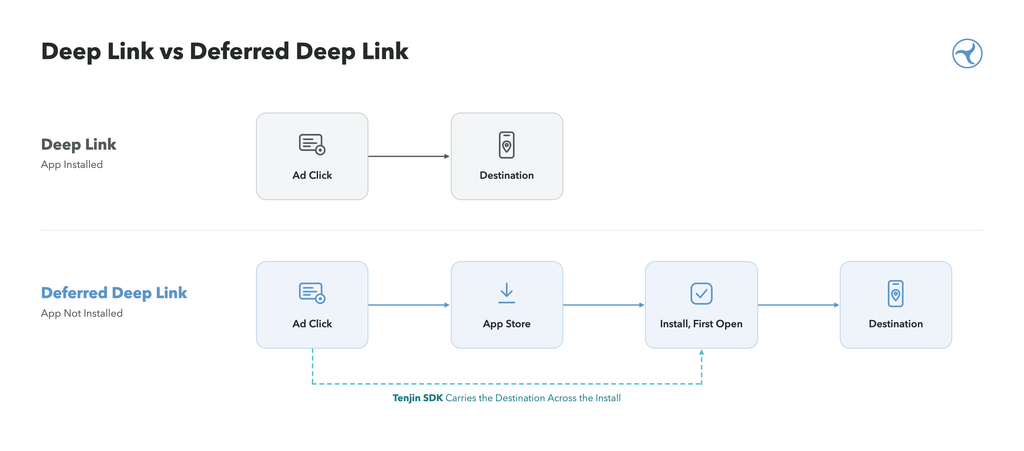
How Deferred Deep Linking Works
- A user taps an ad or link that includes an in-app destination.
- The app isn’t installed, so they go to the App Store or Google Play.
- The destination is saved against that click.
- The user installs and opens the app.
- The SDK in the app retrieves the saved destination, and the app routes the user to the matching screen.
Let’s consider a user who clicks an ad for a certain event within a game. After installing and then opening the app, the user would expect to be redirected to that particular event instead of a generic home screen.
Testing Platforms Before Launch
Each platform, iOS and Android, render install journeys a bit differently. To ensure everything works, you have to test the complete flow on both platforms, with the app uninstalled, before a campaign is set to go live. When testing you should confirm the following:
- Campaign links open the corresponding store page
- The app receives the intended destination on first open
- The destination is linked correctly in the app
- Users without valid destinations follow a safe default route
When to Use Deferred Deep Linking
Deferred deep linking is worth the setup when your campaign promotes something very specific and it’s not accessible from the default first screen. Try to ask yourself these three questions to help you determine if deferred deep linking is the right option for your app:
- Does the ad show a specific event, product, lesson, or feature?
- Would a new user have to search hard to find it?
- Is the promoted content the main reason why they installed? (Offer, reward, course)
If the answer to any of the questions is yes, then deferred deep linking would be useful for the users’ first session. On the other hand, if it’s an ad that promotes the app as a whole, then default onboarding may be the right choice.
Deferred deep linking can also be useful for referral and creator campaigns. A user can arrive at a reward, onboarding flow, or content experience that matches the creator or partner who sent them.
How to Use Deferred Deep Linking by App Type
The value of deferred deep linking depends on the promise in the campaign, not simply the category of app. Use these examples as a starting point, then let campaign performance guide your decisions.
| App Type | Example Campaign Promise | Possible Destination | What to Measure |
| Hypercasual games | A specific mode, skin, or referral reward | The relevant mode, reward, or event | First-session engagement, D1 retention, ad revenue per user |
| Casual and puzzle games | A live event or themed level pack | Event information, a themed experience, or the relevant flow after onboarding | D1 and D7 retention, first purchase, ad revenue |
| Mid-core and strategy games | A season, hero, faction, or guild invite | The relevant event, content, or post-tutorial destination | Tutorial completion, first purchase, D7 ROAS |
| Hybrid monetization games | An event or offer that may drive purchases and ad engagement | The promoted event or offer | IAP and IAA revenue together, ROAS by campaign |
| Learning apps | A subject, course, or lesson | The relevant course or lesson flow | Onboarding completion, first lesson completed, trial start |
| Subscription apps | A program, content collection, or offer | The relevant content or onboarding path | Trial start, trial-to-paid conversion, subscription revenue |
| Utility and productivity apps | A specific tool, template, or workflow | The relevant tool or template | First key action completed, D7 retention |
These app types and destinations are editorial examples, not performance benchmarks. A useful deferred deep link depends on your campaign message, app experience, and measurement plan.
Hypercasual Games
Hypercasual ads usually sell the core gameplay with the first session possibly already delivering that experience. Deferred deep linking may add little unless the campaign promotes something specific like a new mode, skin, event, or referral reward. If your setup time is limited, try to prioritize campaigns where the destination is clear and meaningful.
Casual and Puzzle Games
Live events combined with themed content can be a strong fit. If an ad shows a seasonal event, the first session should make that content easy to find. If the game first requires a tutorial, store the destination and route players there once the tutorial is complete.
Mid-core and Strategy Games
Mid-core ads often feature a specific hero, faction, season, or social group. Players may install to see whether the game matches what they saw in the ad. Taking them to related content after onboarding helps connect the campaign promise with the first session. Guild and clan invites can also be a useful referral use case.
Hybrid Monetization Games
Games that use hybrid monetization earn from IAA and IAP. A more relevant first session can affect either revenue stream, so it’s important to measure them together. You then compare IAP and ad revenue by campaign alongside retention and ROAS. This comparison helps give your team a more clear view of whether the campaign is bringing in valuable users, not just installs.
Learning Apps
A learner who taps an ad for Spanish lessons expects to see Spanish, not a full language menu. Routing a user to the subject or course featured in the campaign can shorten onboarding and get them to a first lesson sooner.
Subscription Apps
Fitness, wellness, and media apps often advertise a specific program, content collection, or benefit. Routing users to the relevant content or onboarding path helps maintain the connection between the campaign and the first app experience. Make sure the price, eligibility, and terms shown in the app match the campaign.
Utility and Productivity Apps
Utility users often install to complete one job, such as scanning a document, editing a photo, or using a template. If campaigns promote different tools, deferred deep linking can direct users to the one they clicked for. If every campaign promotes the same core feature, the default first screen may already be the right place.
How Tenjin Supports Deferred Deep Linking
Tenjin’s current deferred deep linking flow connects a Tenjin tracking link with your app’s destination logic.
1. Add a Destination to Your Tracking Link
Add a deeplink_url parameter to a Tenjin tracking link, with the in-app destination as its value:
https://track.tenjin.io/v0//?…&deeplink_url=mygame://event/winter
URL-encode the value if it contains special characters.
2. Handle the Destination in Your App
When a user installs through the relevant tracking flow and opens the app, the Tenjin SDK makes the returned destination available to your app as deferred_deeplink_url.
Your app receives it though the SDK’s deep link callback: registerDeepLinkHandler on iOS, getDeeplink on Android, and GetDeeplink in Unity. The callback can also include clicked_tenjin_link, is_first_session, and campaign details such as campaign_name.
Your team defines the destination paths and routing logic. Marketing or growth teams can set the intended destination per campaign, while developers determine how each path behaves in the app.
A callback can run in later sessions too, so it’s important to use is_first_session to make sure the routing occurs only once.
What to Know Before You Start
- Organic installs do not get a destination.
Make sure organic users who find your app still land on a sensible first screen. Your developers can check whether deferred_deeplink_url is present to decide which route to take.
- Self-attributing networks (SANs) operate differently.
For SAN networks that have their own attribution scheme (Google, Meta, TikTok) you must set deep links in the network’s own campaign settings.
- Your app requires a route for every destination.
Match all destination paths with developers and growth teams before campaign launch.
- Links that open an installed app.
If a re-engagement link directly opens the app, pass the opening URL to the Tenjin SDK (find SDK documentation here), to make sure re-engagement can be attributed.
What to Measure
- Did the user land at their intended destination screen? Consider sending a custom event such as deeplink_routed, when a user reaches their destination.
- Early engagement: Did the user complete a tutorial, start a lesson, use a tool, or complete another key action?
- Revenue: Measure in-app purchases, subscription starts, and in-app ad revenue where relevant.
- Retention: Compare D1 and D7 retention by campaign.
- ROAS by campaign: Compare campaigns that use deferred deep linking with similar campaigns that send users to a default screen.
Installs after an ad indicates that the ad was a success. However, what happens next tells you whether or not your deep link worked properly. Here’s what you should measure after an install:
For a cleaner comparison, try running two campaigns with the same creative and audience, but one with a deep link and one without. Then compare cohorts over the same window.
If you run retargeting with re-engagement attribution turned on, Tenjin can credit returning users to the campaign that brought them back, once they pass your inactivity threshold. Keep in mind that reinstall identification on iOS is limited with the advertising ID not available.
Getting Started
- Confirm that the Tenjin SDK is integrated in your app.
- List the destinations your campaigns promote and agree on paths with your developers.
- Build the routing logic, including a safe default route and first-session handling.
- Add deeplink_url to the relevant Tenjin tracking links.
- For self-attributing networks, configure the deep link in the network’s campaign settings.
- Test on iOS and Android with the app not installed before launch.
- Add measurement for destination routing and compare post-install outcomes by campaign.
Start with campaigns that promote a specific experience. Measure what happens after install, then expand the setup where it improves the user journey and campaign performance.
For implementation details, see Tenjin’s Deferred Deep Linking documentation. Every Tenjin plan includes complete access to the platform and support, so your team can get help as you set up and test your first links.