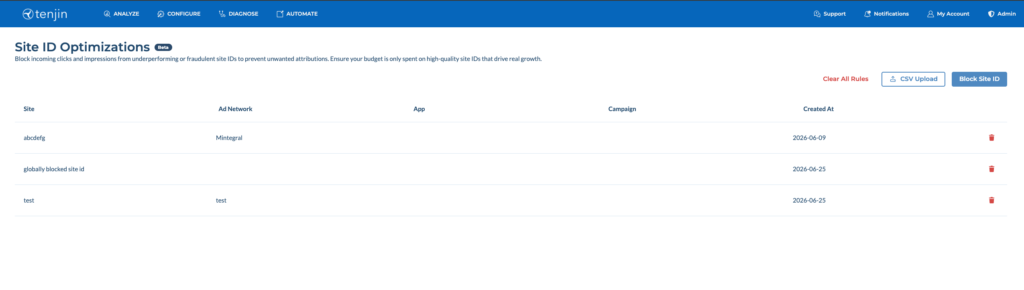
You can now block installs from being attributed to specific site IDs using the SIO Dashboard tool or the API. Site IDs can be blocked at the app, channel, or campaign level.
When a Site ID is blocked, Tenjin will not log ad engagements (clicks and impressions) in our databases – while ads will still be shown to end users.
Please note:
- Tenjin does not send rejection Callbacks to ad networks at this time.
- Tenjin does not report on blocked ad engagements (clicks and impressions).
- This feature is designed for organizations performing in-house fraud analysis or are looking to optimize campaigns.
- While Tenjin can provide guidance, decisions to block site IDs from Attribution are entirely at your discretion.
- We recommend also reaching out to your partner rep when dealing with potential fraud cases.
SIO Dashboard Tool #
Go to Configure > Site ID Optimizations to upload and block site IDs to use the Dashboard Tool.
SIO API #
To use the API instead follow the instructions below:
- You need an API Access Token (a JWT Bearer Token) from the Tenjin dashboard. Create a new one if you haven’t already. API Access Tokens are also needed to access RMA and CMA API endpoints. If you don’t have access to this feature, please email support@tenjin.com.


- Get siteIds from either
- Raw Data Exporter
- S2S Callbacks
- Dashboard group by -> Site ID
- Optionally, you may need campaignId, appId, or AdNetworkShortId to block siteIds at one or a combination of these levels. You can get these IDs from –
- Raw Data Exporter
- S2S Callbacks
- campaignId and appId can be accessed from the Tenjin dashboard.
- You can identify the Ad Network short ID for non-SANs by checking the network name in the tracking link – that segment of the URL represents the short ID.
- Example: for ironSource, the short ID is supersonic, visible in the tracking link like
https://track.tenjin.io/v0/supersonic/bFpF2uljcAyfPCzwUJ0tuZ?…
- Example: for ironSource, the short ID is supersonic, visible in the tracking link like
- If you still need ad_network_id assistance, please reach out to support@tenjin.com.
- For any questions, reach out to support@tenjin.com.
How to use the API – #
Request Parameters #
Required for all requests:
- Host: connect.tenjin.com
- Method: POST
- Content-Type: application/json
- Authorization: JWT Bearer Token generated on the Tenjin Dashboard
Get Your Filter List: #
curl -X POST \
  -d '{}' \
  -H "Content-Type: application/json" \
  -H "Authorization: Bearer your-jwt-token-from-tenjin-dash" \
https://connect.tenjin.com/management.v2.SiteIDFilter/GetOutput:
{
  "version": 0
}The list is empty and uninitialized.
Blocking Site IDs #
curl -X POST \
  -d '{"rules":[{"siteId":"globally blocked site id"}]}' \
  -H "Content-Type: application/json" \
  -H "Authorization: Bearer your-jwt-token-from-tenjin-dash" \
https://connect.tenjin.com/management.v2.SiteIDFilter/BlockKey rules must be an array of objects with:
- siteId, required
- AdNetworkShortId, optional
- appId, optional, uuid
- campaignId, optional, uuid
Key clear is optional and when set to true will clear all previous rules and block new rules in one step.
Output:
{
  "version": 1
}The version got incremented due to a change to the filter rules. Let’s call Get again:
Output:
{
  "version": 1,
  "rules": [
    {
      "siteId": "globally blocked site id",
      "createTime": "2026-01-28T09:53:07.740904Z"
    }
  ]
}Block another Site ID but for a single app only:
curl -X POST \
  -d '{"rules":[{"siteId":"site id blocked for app", "appId":"your-tenjin-app-id"}]}'
  -H "Content-Type: application/json" \
  -H "Authorization: Bearer your-jwt-token-from-tenjin-dash" \
https://connect.tenjin.com/management.v2.SiteIDFilter/BlockOutput:
{
  "version": 2
}Let’s call Get again:
Output:
{
  "version": 2,
  "rules": [
    {
      "siteId": "globally blocked site id",
      "createTime": "2026-01-28T09:53:07.740904Z"
    },
    {
      "appId": "your-tenjin-app-id",
      "siteId": "site id blocked for app",
      "createTime": "2026-01-28T09:53:07.740904Z"
    }
  ]
}Reinstate Site IDs #
You may remove Site IDs from the filter list again:
curl -X POST \
  -d '{"siteIds":["site id blocked for app"]}' \
  -H "Content-Type: application/json" \
  -H "Authorization: Bearer your-jwt-token-from-tenjin-dash" \
https://connect.tenjin.com/management.v2.SiteIDFilter/Reinstate{
"version": 3
}Let’s call Get again:
Output:
{
  "version": 3,
  "rules": [
    {
      "siteId": "globally blocked siteid",
      "createTime": "2026-01-28T09:53:07.740904Z"
    }
  ]
}Clear all Site IDs #
To remove all filter rules:
curl -X POST \
  -d '{}' \
  -H "Content-Type: application/json" \
  -H "Authorization: Bearer your-jwt-token-from-tenjin-dash" \
https://connect.tenjin.com/management.v2.SiteIDFilter/ClearLet’s call Get again:
Output:
{
  "version": 4
}