Retargeting, Re-engagement, and Reattribution #
Retargeting is the campaign you run to bring existing or former users back to your app.
Re-engagement Attribution is how Tenjin measures and credits eligible returns driven by those campaigns.
Some mobile measurement platforms use the term Reattribution for comparable returning-user crediting flows. In Tenjin, for qualifying reactivations and reinstalls we use Re-engagement Attribution as a measure.
For a more in-depth explanation of these terms, please see our glossary entry Re-engagement.
Before you start #
To measure Re-engagement from a mobile app retargeting campaign, Tenjin needs to to first identify an eligible paid engagement and then a qualifying return to your app.
A qualifying return can be:
- A reactivation (re-open): the user kept the app installed and opens it again after engaging with a qualifying campaign.
- A reinstall: the user deleted the app, then installs and opens it again after engaging with a qualifying campaign.
Tenjin measures eligible returns through Re-engagement Attribution. The qualifying return must also meet your configured inactivity threshold, Attribution Window, and channel eligibility rules.
For more information on how Tenjin credits returning users or reports reactivations and reinstalls, see Re-engagement Attribution. For straightforward explanation of how Tenjin uses Re-engagement terminology view our glossary entry: Re-engagement.
1. Turn on Re-engagement for the App #
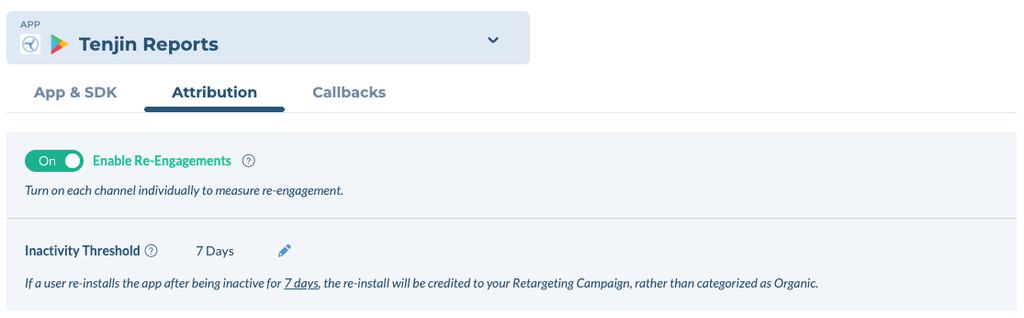
In the app’s Attribution settings, turn on Re-engagement and set the Inactivity threshold.
- The inactivity threshold is how long a user must be inactive before a return can be re-attributed: default 7 days, configurable 1–30, counted in full UTC calendar days.
- A shorter threshold re-attributes more returning users, and sooner. A longer threshold re-attributes fewer, and moves less credit off your acquisition campaigns.
2. Turn on Re-engagement for Each Channel #
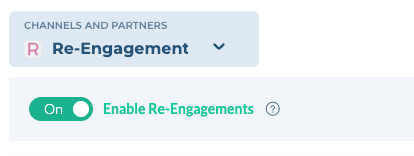
The Re-engagement toggle appears in the channel’s settings once that channel has been enabled for Re-engagement from Tenjin’s side. If you don’t see the toggle appear, it means the channel is being enabled. You can also contact Tenjin Customer Support.
Both methods work; the app switch from Step 1 must be on for both.
- Channel Toggle: in the channel’s settings for the app, turn on Re-engagement. Every campaign on that channel becomes eligible. Self-attributing networks (Google, Meta, TikTok) support this method only.
- Per Campaign: add
&retargeting=trueto the campaign’s tracking link and keep the channel toggle off. Use this when only some campaigns on a channel are retargeting. Non-SAN channels only.
3. Callback to the channel #
- Self-attributing Networks: nothing to change; make sure the Install callback is on.
- Other Channels: a separate Re-engagement callback needs to be turned on in addition to the Install callback, so the channel can tell a returning user from a new one.
Create Campaign Links for Retargeting Campaigns #
Use the following steps to create and configure links for your mobile app retargeting campaigns. These links allow Tenjin to associate an eligible returning user with the campaign that brought them back.