Retargeting、Re-engagement与Reattribution #
Retargeting(再营销)是指为了把现有或流失用户带回应用而投放的campaign。
Re-engagement Attribution(再营销归因)是Tenjin衡量并归因这类campaign带来的有效回归的方式。
Some mobile measurement platforms use the term reattribution for comparable returning-user crediting flows. In Tenjin, for qualifying reactivations and reinstalls we use Re-engagement Attribution as a measure.
这些术语的详细解释请参阅术语表条目Re-engagement。
准备工作 #
要衡量再营销campaign带来的Re-engagement,Tenjin需要先识别一次符合条件的付费广告互动,再识别一次符合条件的应用回归。
符合条件的回归包括:
- 重新激活(Reactivation):用户未删除应用,在与符合条件的campaign互动后再次打开应用。
- 重装(Reinstall):用户删除了应用,在与符合条件的campaign互动后重新安装并打开应用。
Tenjin measures eligible returns through Re-engagement Attribution. The qualifying return must also meet your configured inactivity threshold, attribution window, and channel eligibility rules.
关于Tenjin如何归因回归用户、如何报告重新激活和重装,请参阅Re-engagement Attribution。Tenjin中Re-engagement相关术语的简要说明请查看术语表条目:Re-engagement。
1. 为应用开启Re-engagement #
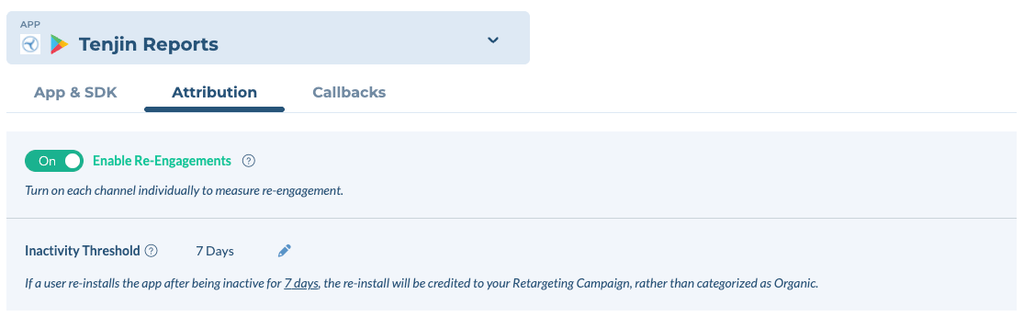
在应用的Attribution设置中开启Re-engagement,并设置Inactivity threshold(不活跃阈值)。
- 不活跃阈值是指用户需要不活跃多长时间,回归才能被重新归因:默认7天,可设置为1–30天,按完整的UTC自然日计算。
- 阈值越短,被重新归因的回归用户越多、越快;阈值越长,被重新归因的用户越少,从拉新campaign转走的归因也越少。
2. 为每个渠道开启Re-engagement #
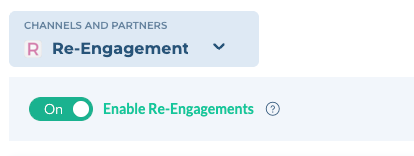
The Re-engagement toggle appears in the channel’s settings once that channel has been enabled for re-engagement from Tenjin’s side. If you don’t see the toggle appear, it means the channel is being enabled. You can also contact Tenjin Customer Support.
以下两种方式都可以,但都必须先开启第1步中的应用开关。
- 渠道开关:在该应用的渠道设置中开启Re-engagement,该渠道下的所有campaign都会参与。自归因网络(Google、Meta、TikTok)仅支持这种方式。
- 按campaign设置:在campaign的追踪链接后添加
&retargeting=true,并保持渠道开关关闭。适用于渠道下只有部分campaign是再营销的情况,仅限非自归因网络渠道。
3. 向渠道发送回调 #
- 自归因渠道:无需修改,只需确保已开启安装回传。
- 其他渠道:除安装回传外,还需要额外开启一个Re-engagement回传,渠道才能区分回归用户和新用户。
为再营销campaign创建链接 #
按以下步骤为应用的再营销campaign创建并配置链接。Tenjin通过这些链接,把符合条件的回归用户关联到带回他们的campaign。自归因网络(SAN)不使用追踪链接,可跳过本节。
- Create a campaign for the channel and copy its tracking links. See Create Campaign and Tracking Links.
- If you chose Per Campaign in Step 2, add
&retargeting=trueto the click URL and the impression URL. - To open the app from the ad, add
&deeplink_url=<your URL-encoded custom URL scheme>&deeplink=1to the click URL. See Deep linking for Re-targeting campaigns. - 将更新后的链接填回渠道后台对应的campaign中。
点击链接示例:
https://track.tenjin.io/v0/<channel>/<campaign_id>?advertising_id={advertising_id}&click_id={click_id}&retargeting=true&deeplink_url=myapp%3A%2F%2F&deeplink=1