再营销广告面向的是已安装或曾经安装过您应用的用户。要把用户带回应用,广告必须通过深度链接直接打开应用。
深度链接与延迟深度链接 #
- 深度链接:用户已安装应用,链接会直接打开应用并进入目标页面。
- Deferred deep link: the user doesn’t have the app, which for retargeting means a reinstall. The link goes to the app store, and the app reads the destination from the Tenjin SDK after it is opened. See If the user reinstalls, Deferred Deep Linking and LiveOps Campaigns.
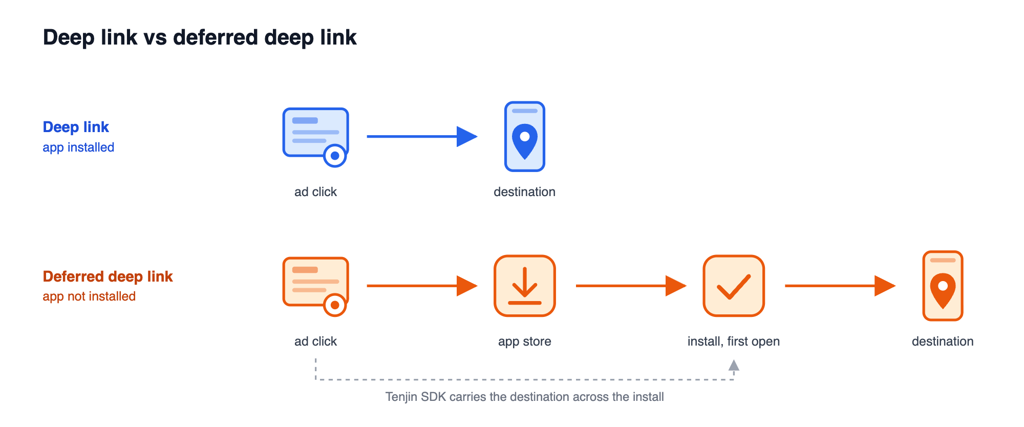
深度链接的类型 #
| 自定义URL scheme | Universal Links(iOS)/App Links(Android) | |
|---|---|---|
| 例子 | myapp://shop/item/1 | https://yourdomain.com/shop/item/1 |
| 跳转行为 | 已安装应用时直接打开应用。使用Tenjin追踪链接时,未安装应用的用户会跳转到回退页面(fallback)。 | 已安装应用时打开应用,否则打开网页。回退机制由操作系统内置。 |
| 设置 | 适用于所有渠道,设置最简单:只需在应用中注册scheme,无需在域名上做任何配置。 | 链接所用的域名需要与您的应用完成验证:域名上要放置验证文件(apple-app-site-association、assetlinks.json),应用内也要有对应配置(iOS为Associated Domains entitlement,Android为带autoVerify的intent filter)。 |
| 浏览器兼容性 | 所有浏览器均支持。部分浏览器会在打开应用前要求用户确认。 | 并非所有浏览器或应用内浏览器都支持;不支持时,即使已安装应用,链接也会以网页形式打开。 |
| 配合Tenjin追踪链接使用 | 支持。请使用这种类型。 | 不支持用于打开应用,用户会照常跳转到原本的目标地址。 |
深度链接放在哪里 #
许多渠道会根据您在渠道中设置的深度链接自行打开应用,例如自归因渠道(Google、Meta、TikTok)以及OPPO、小米等OEM应用商店渠道。Tenjin追踪链接不参与这一跳转。
其他渠道则依靠Tenjin追踪链接来打开应用。请在campaign的点击链接(click URL)中加入以下两个参数,这些渠道的设置方法都一样。
| 参数 | Value | 功能介绍 |
|---|---|---|
deeplink_url | 经过URL编码的自定义URL scheme。例如, myapp:// 编码后为 myapp%3A%2F%2F. | 指定用户进入应用后到达的页面。 |
deeplink | 1 | Turns on opening the app directly. Without it, the user goes to the normal destination, even if deeplink_url is set. |
点击链接示例:
https://track.tenjin.io/v0/<channel>/<campaign_id>?advertising_id={advertising_id}&click_id={click_id}&deeplink_url=myapp%3A%2F%2F&deeplink=1Add deeplink=1 to the click URL only. The impression URL doesn’t redirect users, so it doesn’t need it. There is no dashboard setting for this yet, so add the parameters to your tracking links by hand.
用户点击后会发生什么 #
With deeplink=1 and a custom URL scheme in deeplink_url:
| 用户点击时所在的环境 | What happens |
|---|---|
| Android上的Chrome | 直接打开应用。如未安装应用,用户会跳转到回退页面。 |
| iOS上的任意浏览器 | 先进入Tenjin中转页面尝试打开应用,浏览器可能会要求用户确认。如果4秒后用户仍停留在该页面,则跳转到回退页面。 |
| 应用内浏览器及Android上的其他浏览器 | 通常同样会进入上述Tenjin中转页面,部分浏览器可能直接打开应用。 |
| 桌面端,或与应用平台不匹配的设备 | 跳转到原本的目标地址。 |
The fallback is your app’s store page by default. To send users somewhere else, add redirect_url to the click URL with a web link. redirect_url can’t hold a custom URL scheme: a value like myapp:// is ignored and the user goes to the store.
用户重装时 #
If the user reinstalled after the inactivity threshold, Tenjin saves the deep link from their click and the SDK can return it as deferred_deeplink_url. It may not be ready the moment the app opens, so read it with getAttributionInfo and retry if it’s empty. Only route the user on it once. See LiveOps Campaigns for sample code.
A reinstall before the inactivity threshold keeps its original attribution, so it doesn’t get the new deep link. See Re-engagement Attribution.
开发者设置 #
开发者需要在应用中注册自定义URL scheme,iOS和Android都要设置。
- The bare scheme,
yourgame://with nothing after it, must open the app. Opening a specific screen is optional. - Pick a scheme no other app is likely to register, such as
yourstudio-yourgame. If two apps register the same scheme, iOS doesn’t define which one opens. - 已经在用Universal Links或App Links?可以继续保留,但仍需为Tenjin追踪链接另外设置一个自定义scheme。
iOS #
- Xcode: target settings > Info tab > URL Types > add your scheme, without
://. See Apple’s guide, Defining a custom URL scheme for your app. - Unity: Edit > Project Settings > Player > iOS > Other Settings > Configuration > Supported URL schemes, add your scheme without
://. See Unity’s guide, Deep linking on iOS.
Android #
在启动Activity(即带有MAIN/LAUNCHER filter的那个)中添加以下intent filter,作为与原filter并列的第二个filter:
<intent-filter>
    <action android:name="android.intent.action.VIEW" />
    <category android:name="android.intent.category.DEFAULT" />
    <category android:name="android.intent.category.BROWSABLE" />
    <data android:scheme="yourgame" />
</intent-filter>- Leave out
android:host. If you set a host (for example,yourgame://open), the bare scheme won’t open the app, so use that full link as yourdeeplink_urlinstead. - The activity needs
android:exported="true", otherwise a browser can’t open it. - Unity: Edit > Project Settings > Player > Android > Publishing Settings > Build > enable Custom Main Manifest. Then add the filter inside the UnityPlayerActivity (or UnityPlayerGameActivity) element in
Assets/Plugins/Android/AndroidManifest.xml. See Unity’s guide, Deep linking on Android.
测试 #
在已安装应用的设备上:
- Check the scheme. On iOS, type
yourgame://into Safari’s address bar and tap Open. On Android, runadb shell am start -W -a android.intent.action.VIEW -d "yourgame://". The app should come to the front. Use adb rather than Chrome’s address bar, because Chrome blocks app launches from typed URLs. - Check the tracking link. Open your click URL with
deeplink_urlanddeeplink=1in the phone’s browser (Safari or Chrome). The app should open. Don’t open it from inside Slack or another app, because the link may not redirect there.