Subscription Revenue Tracking shows you how much money your subscriptions really make and which campaigns brought in the users who pay. Tenjin gets subscription data straight from the App Store and Google Play, so you don’t have to send revenue events from your app yourself.
Ready to set it up? Go to Set Up Subscription Revenue Tracking.
What you get #
- Your full revenue in one place. Subscription revenue is added to your IAP and ad revenue, so your Total Revenue, LTV and ROAS include everything your app earns.
- Trials, Renewals and cancellations, by campaign. See which channels and campaigns bring in users who start trials, convert to paid, and keep renewing.
- Better ad optimization with one switch. Send Trial Start and Subscription Revenue events to your ad networks. They’re built in, so there are no custom events to set up.
- No double counting. Each trial, payment and renewal is counted once, even if the same purchase also comes in as an in-app purchase, or from RevenueCat on iOS.
How it works #
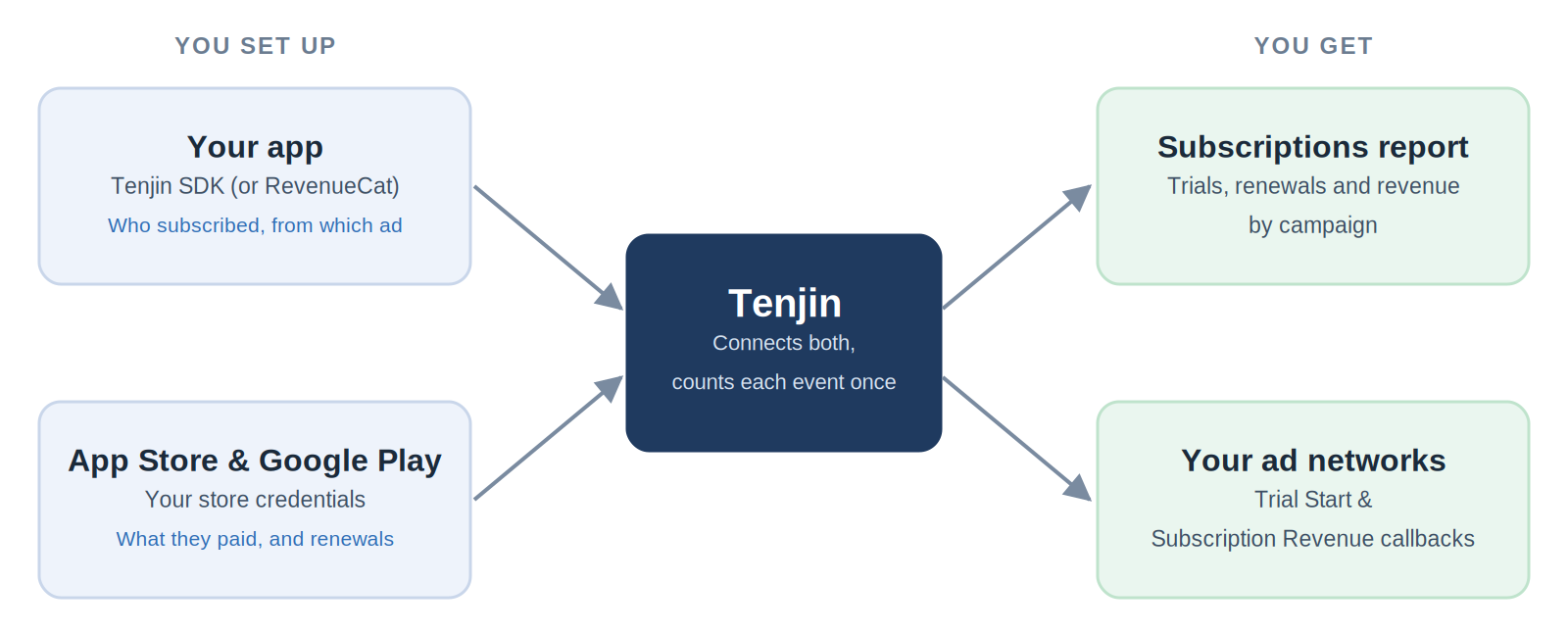
Setup has two main parts, and each one gives Tenjin a different piece of the picture:
| Part | What it tells Tenjin | Without it |
|---|---|---|
| Tenjin SDK (or RevenueCat) | Who subscribed: which user, and which ad campaign brought them in | You’d see subscription revenue, but not which campaign it came from |
| Store credentials | What they bought: price, currency, trial status, Renewals and cancellations | Tenjin would know a purchase happened, but not what it’s worth or whether it renewed |
Together, they give you subscription revenue connected all the way back to the ad that brought in the user.
A simple example #
A user clicks your Meta ad, installs your app, and starts a 7-day free trial. Here’s what happens:
- Day 0: The trial shows up in your Subscriptions report as a New Trial, connected to that Meta campaign. If your Trial Start callback is on, Meta gets the event too.
- Day 7: The trial converts to a paid monthly plan. You see a New Subscription and its revenue. Meta gets a Subscription Revenue event with the amount.
- Every month after: Each payment shows up as a Renewal, and your campaign’s LTV and ROAS keep growing.
- If they cancel: You see a Cancelled Subscription.
Tenjin keeps checking each subscription with the store automatically until it ends. You don’t need to configure anything.
Supported platforms #
- Stores: App Store (iOS) and Google Play (Android)
- SDKs: iOS, Android, Unity, React Native and Flutter
- Subscription platforms: RevenueCat (no SDK work needed)
Subscription metrics #
These metrics are in the Subscriptions report:
| Metric | What it counts |
|---|---|
| New Trials | Free trials started |
| New Subscriptions | First-time paid subscriptions |
| New Subscriptions Revenue | Revenue from first-time paid subscriptions |
| Renewals | Subscription Renewals (repeat payments) |
| Renewals Revenue | Revenue from Renewals |
| All Subscriptions Revenue | New Subscriptions Revenue + Renewals Revenue |
| Cancelled Subscriptions | Subscriptions cancelled by the user or the store |
Compare plans with product_id #
product_id is the name of each subscription plan as it’s set up in App Store Connect or Google Play Console (for example, com.yourapp.premium.monthly). Group your report by product_id to compare plans, for example, how your monthly and annual plans convert and renew.
Subscription revenue in your Total Revenue, LTV and ROAS #
Subscription revenue is automatically included in Tenjin’s combined revenue metrics. Look for metrics with “+ Subscriptions” in the name, for example:
- All Revenue (Ad Network + IAP + Subscriptions)
- 7-Day All LTV (Ad Network + IAP + Subscriptions)
- 30-Day All ROAS (Ad Network + IAP + Subscriptions)
- 90-Day All ROI (Ad Network + IAP + Subscriptions)
Each one is also available in an Ad Mediation + IAP + Subscriptions version, and for any day from Day 0 to Day 365.
Subscription Callbacks #
Trial Start and Subscription Revenue are built-in Callbacks, right next to Install and In-App Purchase on the Callbacks tab. Turn them on per channel, and Tenjin sends the events for you. You don’t need to create custom events or change your app.
- Trial Start helps networks find more users who start trials.
- Subscription Revenue lets networks bid for users who actually pay and renew.
Using RevenueCat #
If you use RevenueCat, add your store credentials in Tenjin and turn on the Tenjin integration in RevenueCat. You don’t need the Tenjin SDK subscription method. You get the same Subscriptions report and the same one-switch Callbacks.
For iOS apps, Tenjin combines both sources and removes duplicates automatically, so each event is counted once. Deduplication for Android apps is coming soon. See the FAQ below for how to set up your Callbacks.
FAQ #
Can I use Tenjin subscription tracking alongside RevenueCat or other third-party purchase integrations? #
Why are my Tenjin numbers different from RevenueCat’s? #
Will subscription revenue be counted twice with my IAP revenue? #
Do I need a developer to set this up? #
How long until I see data? #
Get started #
Follow Set Up Subscription Revenue Tracking. Questions? Email us at support@tenjin.com.